
I was doing SEO for a cybersecurity company. Yes, for real.
Routine audit. I ran site:theirdomain.com and started paginating through the results. Page one looked fine. Page two, fine. By page eight, I found it: a subdomain I'd never seen before, indexed and ranking for counterfeit Viagra and Cialis. A cybersecurity company, compromised by a textbook pharma hack. The irony wasn't lost on anyone.
The attackers had spun up a subdomain and used cloaking: spam content visible only to Googlebot, invisible to human visitors checking the main site. By the time I found it buried in paginated search results, it had been there for months. The cleanup took weeks.
This is what it looks like when cybersecurity and SEO collide. Most SEO people don't think about server security. Most sysadmins don't think about search rankings. The attackers understand both. (For the SEO-side defense playbook, see Defensive SEO: The Moat Nobody Builds.)
The Intersection Nobody Watches
SEO conferences don't have server hardening talks. Security conferences don't discuss ranking signals. This blind spot is a gift to attackers.
Consider the numbers. Google Safe Browsing protects over five billion devices. It flags more than 10,000 malicious pages every day. During major malware campaigns, users receive over 90 million browser warnings per week. When your site gets on that list, visitors see a red warning screen instead of your content. Your carefully built SEO becomes worthless.
The numbers are staggering. Wordfence's 2024 report documented 7,966 new WordPress vulnerabilities - a 34% increase over 2023. That's 22 new vulnerabilities per day. 96% were in plugins. Patchstack's 2025 State of WordPress Security found 58.86% required no authentication to exploit. Each plugin is an attack surface. Each one is a potential doorway to SEO destruction.
Here's what SEO people don't understand: your server is an SEO asset. When it gets compromised, your rankings die. One case study documented a site that got hacked, received a manual penalty from Google, and didn't recover for three days even with direct help from Google's John Mueller. For a small business without connections, that becomes weeks or months.
Diagram 1: Server Attack Surface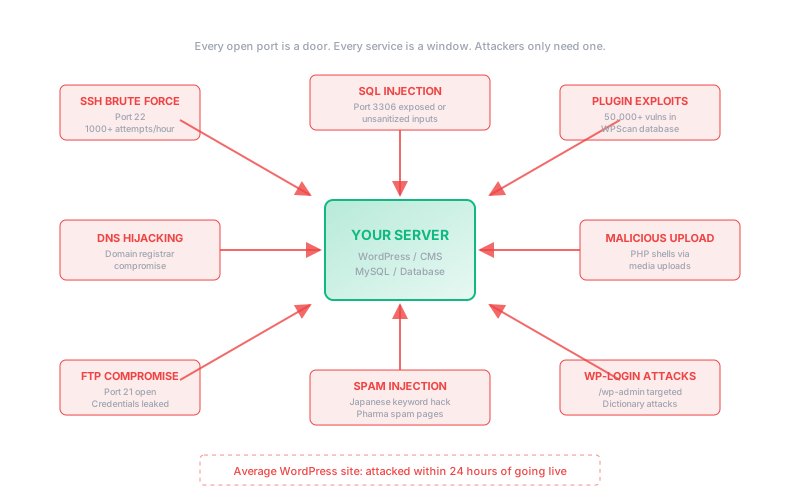
The Attacks That Kill Rankings
Not all hacks are created equal. Some steal data. Some mine cryptocurrency. But the ones that destroy SEO are specifically designed to exploit your search visibility.
The Pharma Hack
The pharma hack (also called the Viagra/Cialis hack) hijacks your site to promote pharmaceutical spam. The attack is elegant in its deception: it uses cloaking to show spam only to search engine crawlers while displaying normal content to human visitors.
You see your homepage. Googlebot sees "Buy Cheap Cialis Online." Your site starts ranking for drug keywords. Google flags you for spam. Your legitimate rankings evaporate.
Detection is tricky because you can't see it by visiting your own site. Here's how to check:
# Search Google for pharmaceutical terms on your domain
# If results appear, you're compromised

# Check for common pharma spam terms
site:yourdomain.com viagra
site:yourdomain.com cialis
site:yourdomain.com pharmacy

# Check for the reversed-string database trick
# Attackers store "viagra" as "argaiv" to evade detection
mysql -u root -p -e "SELECT * FROM wp_options WHERE option_value LIKE '%argaiv%' OR option_value LIKE '%silaic%';"
Japanese Keyword Hack
The Japanese keyword hack creates thousands of auto-generated pages with Japanese text, typically selling counterfeit luxury goods. Your domain suddenly has URLs like /asdf123/グッチ-財布-激安/.
Like the pharma hack, it uses cloaking. The pages only appear in search results. Trend Micro's November 2024 research identified 692,865 fake e-commerce sites linked to these black-hat SEO campaigns between May 2022 and December 2024. Sucuri's 2024 report detected Japanese SEO spam on 117,393 websites that year alone.
# Check Google for Japanese characters on your domain
site:yourdomain.com

# Look in the results for Japanese text in titles/descriptions
# If you see characters you didn't create, you're compromised

# Search for Japanese text in your files
grep -r "[\x{3040}-\x{309F}]" /var/www/html/ --include="*.php"
grep -r "[\x{30A0}-\x{30FF}]" /var/www/html/ --include="*.php"

# Check for suspicious new files
find /var/www/html -type f -name "*.php" -mtime -7 -ls

# Look for base64-encoded payloads (common obfuscation)
grep -r "base64_decode" /var/www/html/ --include="*.php"
grep -r "eval(" /var/www/html/ --include="*.php"
SQL Injection Spam
Akamai documented a campaign that used SQL injection to inject SEO spam into over 3,800 websites. The attackers inserted hidden HTML links directly into databases. The content was only visible to search engines, making it nearly impossible for site owners to detect manually.
These attacks exploit vulnerable applications to inject spam directly into your database. In April 2024, CVE-2024-27956 exposed a critical SQL injection flaw in the WP-Automatic plugin that allowed unauthenticated attackers to execute arbitrary SQL queries - perfect for injecting SEO spam. Sucuri found variants that create fake backup tables to store spam posts, using different database prefixes so the posts won't show in your admin dashboard.
# Check for suspicious tables in your database
mysql -u root -p -e "SHOW TABLES LIKE 'backup%';" your_database

# Search for hidden iframes or spam links
mysql -u root -p -e "SELECT * FROM wp_posts WHERE post_content LIKE '%<iframe%' OR post_content LIKE '%display:none%';" your_database

# Look for external links you didn't add
mysql -u root -p -e "SELECT post_title, post_content FROM wp_posts WHERE post_content REGEXP 'href=.*(viagra|cialis|casino|porn)';"
Cloaking is the weapon
All these attacks use cloaking. They detect Googlebot by user agent or IP and serve different content. You browse your site and see nothing wrong. Google crawls your site and sees spam. By the time you notice in Search Console, the damage is done. Log file analysis can reveal what Googlebot actually sees.
The Server Audit
Before you can defend, you need to know if you're already compromised. Here's a complete audit script.
#!/bin/bash
# Server Security Audit for SEO Protection
# Run as root or with sudo

echo "=== SERVER SECURITY AUDIT ==="
echo "Date: $(date)"
echo ""

# 1. Check for unauthorized users
echo "=== CHECKING USERS ==="
echo "Users with login shells:"
grep -E '/bin/(bash|sh|zsh)' /etc/passwd

echo ""
echo "Users with UID 0 (root privileges):"
awk -F: '$3 == 0 {print $1}' /etc/passwd

echo ""
echo "Recent successful logins:"
last -n 20

# 2. Check for suspicious processes
echo ""
echo "=== CHECKING PROCESSES ==="
echo "Processes running as www-data (web server):"
ps aux | grep -E '^(www-data|apache|nginx)'

echo ""
echo "High CPU processes:"
ps aux --sort=-%cpu | head -10

# 3. Check for suspicious files
echo ""
echo "=== CHECKING FILES ==="
echo "PHP files modified in last 7 days:"
find /var/www -name "*.php" -mtime -7 -type f 2>/dev/null | head -20

echo ""
echo "Files with dangerous functions:"
grep -r -l "eval\|base64_decode\|gzinflate\|str_rot13" /var/www --include="*.php" 2>/dev/null | head -20

echo ""
echo "World-writable files in web root:"
find /var/www -type f -perm -0002 2>/dev/null | head -20

# 4. Check for backdoors
echo ""
echo "=== CHECKING FOR BACKDOORS ==="
echo "Files with shell execution functions:"
grep -r -l "shell_exec\|system\|passthru\|exec(" /var/www --include="*.php" 2>/dev/null | head -20

echo ""
echo "Suspicious .htaccess rules:"
find /var/www -name ".htaccess" -exec grep -l "RewriteCond.*HTTP_USER_AGENT.*googlebot" {} \; 2>/dev/null

# 5. Check network connections
echo ""
echo "=== CHECKING NETWORK ==="
echo "Listening ports:"
ss -tlnp

echo ""
echo "Established connections:"
ss -tnp | grep ESTABLISHED | head -20

# 6. Check for cron jobs
echo ""
echo "=== CHECKING SCHEDULED TASKS ==="
echo "System crontab:"
cat /etc/crontab

echo ""
echo "User crontabs:"
for user in $(cut -f1 -d: /etc/passwd); do
    crontab -u $user -l 2>/dev/null | grep -v "^#" | grep -v "^$"
done

echo ""
echo "=== AUDIT COMPLETE ==="
Save that as security-audit.sh, run it with sudo bash security-audit.sh > audit-$(date +%Y%m%d).txt, and review the output. If you find files with eval, base64_decode, or gzinflate that you didn't create, you're compromised.
Defense Layer 1: The Firewall
Here's my second story. I logged into a VPS I owned and found databases I'd never created. Users I'd never added. Someone had been living in my server.
The cause? No firewall enabled. SSH accepting password authentication. Two rookie mistakes that took me seconds to fix and would have prevented months of unauthorized access. The attacker had probably brute-forced the password or exploited some leaked credential.
UFW (Uncomplicated Firewall) is your first line of defense. It controls what traffic can reach your server.
Diagram 2: Defense Layers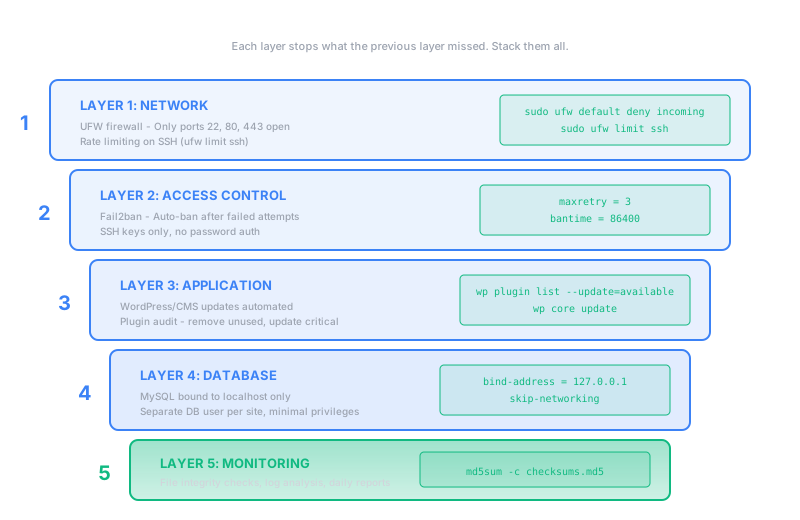
# Reset UFW to defaults
sudo ufw reset

# Set default policies
sudo ufw default deny incoming
sudo ufw default allow outgoing

# Allow SSH (change 22 to your SSH port if different)
sudo ufw allow 22/tcp comment 'SSH'

# Allow HTTP and HTTPS
sudo ufw allow 80/tcp comment 'HTTP'
sudo ufw allow 443/tcp comment 'HTTPS'

# Rate limit SSH to prevent brute force
sudo ufw limit ssh

# Enable UFW
sudo ufw enable

# Check status
sudo ufw status verbose
That's the minimum. Your server now only accepts SSH, HTTP, and HTTPS. Everything else gets dropped.
Defense Layer 2: Fail2ban
Fail2ban watches your logs and automatically bans IPs that show malicious behavior. It stops brute force attacks before they succeed.
# Install fail2ban
sudo apt update && sudo apt install fail2ban -y

# Create local config (don't edit jail.conf directly)
sudo cp /etc/fail2ban/jail.conf /etc/fail2ban/jail.local

# Edit the config
sudo nano /etc/fail2ban/jail.local
Add this configuration:
[DEFAULT]
# Ban for 1 hour
bantime = 3600

# Check the last 10 minutes
findtime = 600

# Ban after 5 failures
maxretry = 5

# Email alerts (optional)
destemail = your@email.com
sender = fail2ban@yourdomain.com
action = %(action_mwl)s

[sshd]
enabled = true
port = ssh
filter = sshd
logpath = /var/log/auth.log
maxretry = 3
bantime = 86400

[nginx-http-auth]
enabled = true
filter = nginx-http-auth
port = http,https
logpath = /var/log/nginx/error.log

[nginx-limit-req]
enabled = true
filter = nginx-limit-req
port = http,https
logpath = /var/log/nginx/error.log

[nginx-botsearch]
enabled = true
filter = nginx-botsearch
port = http,https
logpath = /var/log/nginx/access.log
maxretry = 2# Restart fail2ban
sudo systemctl restart fail2ban
sudo systemctl enable fail2ban
# Check status
sudo fail2ban-client status
# Check specific jail
sudo fail2ban-client status sshd
# View banned IPs
sudo fail2ban-client status sshd | grep "Banned IP"
# Manually unban an IP if needed
sudo fail2ban-client set sshd unbanip 192.168.1.100Defense Layer 3: File Integrity Monitoring
You need to know when files change. Attackers modify PHP files to inject their payloads. If you can detect changes immediately, you can respond before the damage spreads.
#!/bin/bash
# File Integrity Monitor for Web Root
# Save as /usr/local/bin/file-monitor.sh

WEB_ROOT="/var/www/html"
HASH_FILE="/var/log/file-hashes.txt"
ALERT_EMAIL="your@email.com"

# Generate current hashes
find "$WEB_ROOT" -type f \( -name "*.php" -o -name "*.js" -o -name ".htaccess" \) \
    -exec md5sum {} \; | sort > /tmp/current-hashes.txt

# First run: create baseline
if [ ! -f "$HASH_FILE" ]; then
    cp /tmp/current-hashes.txt "$HASH_FILE"
    echo "Baseline created: $(wc -l < "$HASH_FILE") files"
    exit 0
fi

# Compare with baseline
CHANGES=$(diff "$HASH_FILE" /tmp/current-hashes.txt)

if [ -n "$CHANGES" ]; then
    echo "FILE CHANGES DETECTED at $(date)"
    echo "$CHANGES"

    # Send alert
    echo -e "File changes detected on $(hostname):\n\n$CHANGES" | \
        mail -s "ALERT: File changes on $(hostname)" "$ALERT_EMAIL"

    # Log the change
    echo "$(date): Changes detected" >> /var/log/file-monitor.log
    echo "$CHANGES" >> /var/log/file-monitor.log
fi

# Update baseline (comment out if you want manual updates only)
# cp /tmp/current-hashes.txt "$HASH_FILE"# Make script executable
sudo chmod +x /usr/local/bin/file-monitor.sh
# Run the first time to create baseline
sudo /usr/local/bin/file-monitor.sh
# Add to crontab (check every 15 minutes)
sudo crontab -e
# Add this line:
*/15 * * * * /usr/local/bin/file-monitor.sh 2>&1 | logger -t file-monitorDefense Layer 4: Database Hardening
Your database is where the content lives. SQL injection attacks target it directly. Hardening MySQL/MariaDB reduces your attack surface.
# Run the security script (for new installations)
sudo mysql_secure_installation

# This will prompt you to:
# - Set root password
# - Remove anonymous users
# - Disallow root login remotely
# - Remove test database
# - Reload privilege tables

# For existing installations, do it manually:
mysql -u root -p-- Remove anonymous users
DELETE FROM mysql.user WHERE User='';
-- Remove remote root login
DELETE FROM mysql.user WHERE User='root' AND Host NOT IN ('localhost', '127.0.0.1', '::1');
-- Remove test database
DROP DATABASE IF EXISTS test;
DELETE FROM mysql.db WHERE Db='test' OR Db='test\\_%';
-- Create application-specific user (not root)
CREATE USER 'webapp'@'localhost' IDENTIFIED BY 'strong_random_password_here';
GRANT SELECT, INSERT, UPDATE, DELETE ON your_database.* TO 'webapp'@'localhost';
-- No GRANT privilege (prevent privilege escalation)
-- No FILE privilege (prevent file read/write)
-- No PROCESS privilege (prevent process listing)
FLUSH PRIVILEGES;# Edit MySQL config
sudo nano /etc/mysql/mysql.conf.d/mysqld.cnf
# Add these lines under [mysqld]:
# Bind only to localhost (no remote connections)
bind-address = 127.0.0.1
# Disable local file loading (prevents reading server files)
local-infile = 0
# Disable symbolic links (prevents symlink attacks)
symbolic-links = 0
# Log slow queries (helps detect injection attacks)
slow_query_log = 1
slow_query_log_file = /var/log/mysql/slow.log
long_query_time = 2
# Restart MySQL
sudo systemctl restart mysqlDefense Layer 5: Web Application Firewall
ModSecurity is an open-source WAF that filters malicious requests before they reach your application.
# Install dependencies
sudo apt install libmodsecurity3 libmodsecurity-dev -y

# For Nginx, compile the connector module
# Or use a pre-built package if available

# Download OWASP Core Rule Set
cd /etc/nginx
sudo git clone https://github.com/coreruleset/coreruleset.git
cd coreruleset
sudo cp crs-setup.conf.example crs-setup.conf
For simpler setups, consider Cloudflare which provides WAF protection without server configuration.
The Complete Hardening Script
Here's a script that implements the core defenses. Run it on a fresh server or adapt it for your existing setup.
#!/bin/bash
# Server Hardening Script for Web Servers
# Run as root on Ubuntu/Debian

set -e
echo "=== SERVER HARDENING SCRIPT ==="
echo "This will configure firewall, fail2ban, and basic security"
read -p "Continue? (y/n) " -n 1 -r
echo
if [[ ! $REPLY =~ ^[Yy]$ ]]; then exit 1; fi

# Update system
echo "[1/8] Updating system..."
apt update && apt upgrade -y

# Install security tools
echo "[2/8] Installing security tools..."
apt install -y ufw fail2ban unattended-upgrades apt-listchanges

# Configure UFW
echo "[3/8] Configuring firewall..."
ufw default deny incoming
ufw default allow outgoing
ufw allow ssh
ufw allow http
ufw allow https
ufw limit ssh
echo "y" | ufw enable

# Configure fail2ban
echo "[4/8] Configuring fail2ban..."
cat > /etc/fail2ban/jail.local << 'EOF'
[DEFAULT]
bantime = 3600
findtime = 600
maxretry = 5

[sshd]
enabled = true
port = ssh
maxretry = 3
bantime = 86400
EOF

systemctl restart fail2ban
systemctl enable fail2ban

# Secure SSH
echo "[5/8] Hardening SSH..."
# Backup original config
cp /etc/ssh/sshd_config /etc/ssh/sshd_config.backup

# Disable root login and password auth (assumes you have key auth)
sed -i 's/#PermitRootLogin yes/PermitRootLogin no/' /etc/ssh/sshd_config
sed -i 's/PermitRootLogin yes/PermitRootLogin no/' /etc/ssh/sshd_config

# Disable empty passwords
sed -i 's/#PermitEmptyPasswords no/PermitEmptyPasswords no/' /etc/ssh/sshd_config

systemctl restart sshd

# Set secure permissions on web root
echo "[6/8] Setting file permissions..."
if [ -d "/var/www/html" ]; then
    find /var/www/html -type d -exec chmod 755 {} \;
    find /var/www/html -type f -exec chmod 644 {} \;
    chown -R www-data:www-data /var/www/html
fi

# Enable automatic security updates
echo "[7/8] Enabling automatic security updates..."
cat > /etc/apt/apt.conf.d/20auto-upgrades << 'EOF'
APT::Periodic::Update-Package-Lists "1";
APT::Periodic::Unattended-Upgrade "1";
APT::Periodic::AutocleanInterval "7";
EOF

# Create the monitoring script
echo "[8/8] Creating monitoring script..."
cat > /usr/local/bin/security-check.sh << 'SCRIPT'
#!/bin/bash
echo "=== DAILY SECURITY CHECK ==="
echo "Date: $(date)"
echo ""
echo "Failed SSH attempts:"
grep "Failed password" /var/log/auth.log | tail -10
echo ""
echo "Fail2ban status:"
fail2ban-client status sshd
echo ""
echo "Recent PHP file changes:"
find /var/www -name "*.php" -mtime -1 -ls 2>/dev/null
SCRIPT
chmod +x /usr/local/bin/security-check.sh

echo ""
echo "=== HARDENING COMPLETE ==="
echo "Run /usr/local/bin/security-check.sh daily to monitor your server"
echo ""
echo "IMPORTANT: Test SSH login in a new terminal before closing this session!"
Before you lock yourself out
The script disables root login and tightens SSH. Before running it, make sure you have SSH key authentication working and a non-root user with sudo access. Test in a new terminal before closing your current session.
When You've Been Hacked: The Recovery Playbook
If you find evidence of compromise, speed matters. Every hour the infection persists, more spam pages get indexed. Here's the response sequence.
Diagram 3: Incident Response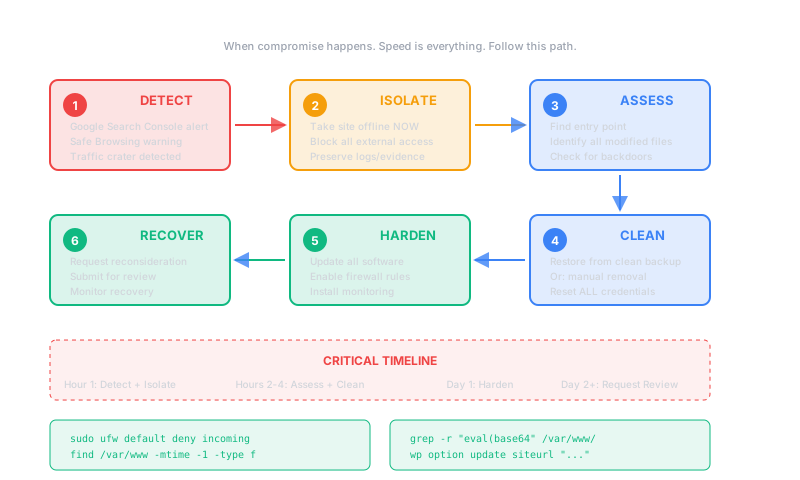
Step 1: Contain
# Take the site offline (prevents more spam from being indexed)
# Option 1: Nginx
sudo systemctl stop nginx

# Option 2: Block all traffic except your IP
sudo ufw deny from any to any port 80
sudo ufw deny from any to any port 443
sudo ufw allow from YOUR.IP.ADDRESS

# Option 3: Maintenance mode (less disruptive)
echo "Site under maintenance" | sudo tee /var/www/html/index.html.maintenance
sudo mv /var/www/html/index.php /var/www/html/index.php.disabled
sudo mv /var/www/html/index.html.maintenance /var/www/html/index.html
Step 2: Assess
# Find recently modified files
find /var/www -type f -mtime -30 -name "*.php" -ls | sort -k11

# Find files with suspicious content
grep -r -l "eval(base64_decode" /var/www --include="*.php"
grep -r -l "eval(gzinflate" /var/www --include="*.php"
grep -r -l "preg_replace.*\/e" /var/www --include="*.php"

# Check for new admin users (WordPress)
mysql -u root -p -e "SELECT * FROM wp_users WHERE user_registered > DATE_SUB(NOW(), INTERVAL 30 DAY);" your_database

# Check .htaccess for redirects
find /var/www -name ".htaccess" -exec grep -l "RewriteCond\|RewriteRule" {} \; -exec cat {} \;

# Look for base64-encoded backdoors
find /var/www -name "*.php" -exec grep -l "base64" {} \; | while read f; do
    echo "=== $f ==="
    grep -n "base64" "$f"
done
Step 3: Clean
# BACKUP FIRST
tar -czvf /root/backup-infected-$(date +%Y%m%d).tar.gz /var/www

# For WordPress: Replace core files
cd /var/www/html
wp core download --force --skip-content

# Remove suspicious files (review the list first!)
find /var/www -name "*.suspected" -delete
find /var/www -name "*.php.bak" -delete

# Reset file permissions
find /var/www/html -type d -exec chmod 755 {} \;
find /var/www/html -type f -exec chmod 644 {} \;
chown -R www-data:www-data /var/www/html

# Remove wp-config.php backdoors (check manually first)
grep -n "eval\|base64\|gzinflate" /var/www/html/wp-config.php

# Update all passwords
# - WordPress admin password
# - Database password (update wp-config.php after)
# - FTP/SFTP passwords
# - Hosting control panel password
Step 4: Request Review
After cleaning, request Google to re-review your site.
# 1. Go to Google Search Console
# 2. Navigate to Security & Manual Actions > Security Issues
# 3. Click "Request Review"
# 4. Describe what you fixed

# For Safe Browsing warnings:
# Go to https://search.google.com/search-console/security-issues

# Check your status:
# https://transparencyreport.google.com/safe-browsing/search?url=yourdomain.com

# Remove hacked pages from index
# In Search Console: Removals > New Request
# For bulk removal, submit updated sitemap with only valid pages
Google's documentation says malware reviews typically complete within days, but some sites remain on the blacklist for 20-30 days if the infection isn't fully removed.
Automated Defense: The Daily Script
Security isn't a one-time task. Here's a script that runs daily, checking for signs of compromise and alerting you.
#!/bin/bash
# /usr/local/bin/daily-security.sh
# Add to crontab: 0 6 * * * /usr/local/bin/daily-security.sh | mail -s "Daily Security Report" you@email.com

echo "============================================"
echo "DAILY SECURITY REPORT - $(hostname)"
echo "Generated: $(date)"
echo "============================================"
echo ""

# 1. Check for failed login attempts
echo "=== FAILED LOGIN ATTEMPTS (last 24h) ==="
grep "Failed password" /var/log/auth.log | grep "$(date -d yesterday '+%b %d')\|$(date '+%b %d')" | wc -l
echo "failed attempts"
echo ""

# 2. Check fail2ban bans
echo "=== FAIL2BAN STATUS ==="
fail2ban-client status sshd 2>/dev/null || echo "fail2ban not running"
echo ""

# 3. Check for new PHP files
echo "=== NEW PHP FILES (last 24h) ==="
find /var/www -name "*.php" -mtime -1 -type f 2>/dev/null
echo ""

# 4. Check for modified core files (WordPress)
if [ -d "/var/www/html/wp-includes" ]; then
    echo "=== MODIFIED WORDPRESS CORE FILES ==="
    find /var/www/html/wp-includes -name "*.php" -mtime -1 2>/dev/null
    find /var/www/html/wp-admin -name "*.php" -mtime -1 2>/dev/null
    echo ""
fi

# 5. Check for suspicious patterns
echo "=== SUSPICIOUS CODE PATTERNS ==="
SUSPICIOUS=$(grep -r -l "eval(base64_decode\|gzinflate\|str_rot13" /var/www --include="*.php" 2>/dev/null | wc -l)
echo "$SUSPICIOUS files with suspicious patterns"
if [ "$SUSPICIOUS" -gt 0 ]; then
    echo "FILES:"
    grep -r -l "eval(base64_decode\|gzinflate\|str_rot13" /var/www --include="*.php" 2>/dev/null
fi
echo ""

# 6. Check disk usage
echo "=== DISK USAGE ==="
df -h | grep -E "^/dev"
echo ""

# 7. Check for listening services
echo "=== LISTENING SERVICES ==="
ss -tlnp | grep LISTEN
echo ""

# 8. Check for outbound connections
echo "=== OUTBOUND CONNECTIONS ==="
ss -tnp | grep ESTABLISHED | awk '{print $5}' | cut -d: -f1 | sort | uniq -c | sort -rn | head -10
echo ""

# 9. SEO-specific: Check for spam in database
if command -v mysql &> /dev/null; then
    echo "=== DATABASE SPAM CHECK ==="
    SPAM=$(mysql -u root -N -e "SELECT COUNT(*) FROM wp_posts WHERE post_content LIKE '%viagra%' OR post_content LIKE '%cialis%';" your_database 2>/dev/null)
    echo "Posts with pharma keywords: ${SPAM:-N/A}"
fi
echo ""

echo "============================================"
echo "END OF REPORT"
echo "============================================"# Make executable
sudo chmod +x /usr/local/bin/daily-security.sh
# Add to root's crontab
sudo crontab -e
# Add this line (runs at 6 AM, emails report):
0 6 * * * /usr/local/bin/daily-security.sh 2>&1 | mail -s "Security Report: $(hostname)" your@email.com
# Make sure mail is configured
sudo apt install mailutils -yThe Cost of Ignoring This
Let me be direct. Most SEO professionals have no idea how their servers are configured. They trust hosting providers. They trust WordPress plugins. They trust that someone else has handled security.
That trust is expensive when it breaks. Sucuri's 2024 report found SEO spam impacted 422,741 websites. Japanese spam, gambling content, and hidden link injections dominated. These aren't theoretical threats.
When a site gets hacked, local SEO takes a double hit: Google removes the GMB landing page URL and deindexes compromised pages. Wordfence estimates that recovery can take months if ranking degraded before you fixed the problem. (If you're seeing unexplained drops, start with Diagnose Any Traffic Drop in 30 Minutes.)
Search Engine Land was deindexed for over 12 hours when Google's system mistakenly identified them as hacked. That's Search Engine Land. If it can happen to them, it can happen to you.
The attackers understand this ecosystem better than most defenders. They know that pharma spam and Japanese keyword hacks are invisible to casual inspection. They know that small business owners check their sites on desktop but the spam triggers only on mobile or for search engine crawlers. They know that by the time the site owner notices, the damage is done.
Your server is not just infrastructure. It's an SEO asset. Every unpatched vulnerability is a ranking liability. Every weak password is a doorway to deindexing. Make sure your technical SEO foundation is solid before and after any incident.
The commands in this article are real. They work. Copy them. Run them. Set up the monitoring. Harden your server.
Or wait until you're googling "why did my traffic disappear" at 3 AM while your competitors climb over your corpse.
Your choice.