
Technical SEO runs on four strokes. Same as every internal combustion engine since Nikolaus Otto figured it out in 1876. You'd think someone in this industry would have mentioned this by now, but no, we're all too busy arguing about whether E-E-A-T is a ranking factor to notice we've been working with internal combustion this whole time.
| Stroke | Phase | What Happens |
|---|---|---|
| INTAKE | Discovery | URLs enter the system |
| COMPRESSION | Processing | Fetching, rendering, parsing |
| COMBUSTION | Indexing | Content becomes searchable |
| EXHAUST | Maintenance | Cache invalidation, deindexing, cleanup |
Any stroke fails, the engine stops. I cannot tell you how many times I've watched an SEO consultant walk into a situation, ignore the fact that the engine isn't turning over at all, and go straight to recommending a content calendar. It's like calling a interior decorator because your house is on fire.
1. Compression Ratio
Engine: Ratio of cylinder volume at bottom vs. top of stroke. Higher ratio = more power from same fuel.
SEO: Ratio of indexable content to total response bytes.
Compression Ratio = (Visible text content bytes) / (Total response bytes)
50KB page, 5KB content = 0.10. You have, and I want you to really sit with this, shipped fifty thousand bytes to display five thousand bytes of actual words. The other forty-five thousand bytes are what, exactly? React? Webpack? The tears of your engineering team? Nobody knows. Nobody asks.
20KB page, 15KB content = 0.75. See, now that's a page that respects itself.
Target: >0.30
Measure it:
- Load page, check response size in DevTools Network tab
- Copy visible text, check byte count
- Divide
Low ratio means: Bloated templates, inline JavaScript that should have been external since 2015, framework overhead from that time someone convinced the team to "modernize," and navigation HTML repeated on every single page like the site has amnesia. You know, the usual.
Fix: Externalize scripts and styles. Simplify templates. Reduce framework bloat.
2. Air-Fuel Ratio
Engine: 14.7:1 air to fuel is stoichiometric. Too lean = misfires. Too rich = wasted fuel, carbon deposits.
SEO: Content-to-code ratio.
Content-to-Code Ratio = (Text content bytes) / (HTML + inline code bytes)
| Page Type | Target |
|---|---|
| Article | 0.35-0.50 |
| Product | 0.25-0.40 |
| Category | 0.15-0.30 |
| Homepage | 0.10-0.20 |
Too low: Running rich. Template bloat. Googlebot downloads two hundred kilobytes, runs it through the renderer, waits for seventeen external scripts to load, and extracts one paragraph and a stock photo of a handshake. This describes most of the internet, by the way.
Too high: Running lean. Possibly thin content, or suspiciously efficient-validate manually.
Fix: Lean out the mixture (reduce code) or enrich it (add substance).
3. Timing Belt
Engine: Synchronizes crankshaft and camshaft. Valves must open at precise moments. Mistiming = catastrophic failure.
SEO: Critical rendering path sequence.
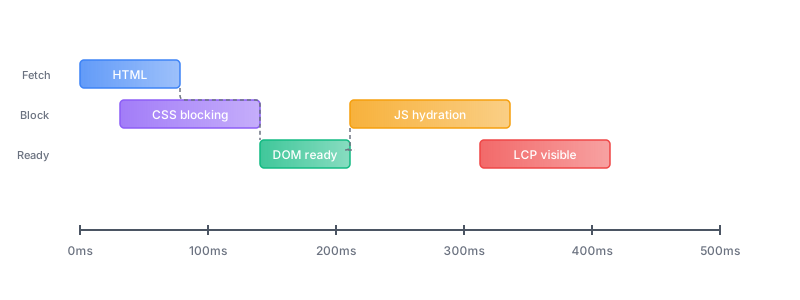
Timing failures:
- CSS late → Flash of unstyled content
- JS before DOM ready → Errors, broken hydration
- LCP resource late → Poor Core Web Vitals
- Fonts late → Layout shift
Diagnose: Capture waterfall in WebPageTest or DevTools. Map the dependencies. Find what's blocking what. I'll save you some time: it's going to be that third-party script marketing added eight months ago for a campaign that ended seven months ago. It's always that script. I don't know why I even bother with the diagnostic steps anymore.
Fix: Preload critical resources. Defer non-critical JS. Async independent scripts. Inline critical CSS. Use font-display: swap.
4. Backpressure
Engine: Exhaust restriction reduces power. Engine works harder to expel gases.
SEO: Third-party resources restrict rendering.
Every external script is backpressure. Count yours:
- Analytics (GA, Mixpanel, Amplitude)
- Tag managers (GTM loading more tags)
- Chat widgets (Intercom, Drift)
- Ads (header bidding, verification)
- Social embeds
- External fonts
- Heatmaps (Hotjar, FullStory)
- A/B testing tools
Total Backpressure = Σ (third-party main thread blocking time)
Target: <200ms total
Measure: DevTools Performance tab. Identify third-party tasks. Sum durations.
Fix: For each third-party script, you have four options: eliminate it, defer it, async it, or self-host it. Most sites, and I mean this sincerely, are loading scripts that were added by employees who left the company three years ago for purposes that nobody can remember. There's a Hotjar on there from 2019. Nobody's looked at the heatmaps since 2019. It's still loading on every page. Just kill it. It won't be missed.
5. Volumetric Efficiency
Engine: How much of cylinder capacity actually fills with mixture. Real engines: 80-95%.
SEO: How much crawl budget is spent on pages that matter.
Volumetric Efficiency = (Valuable pages crawled) / (Total pages crawled)
"Valuable" means the page gets indexed AND drives traffic or conversions. Not "might be useful someday." Not "the VP of Marketing's brother-in-law wrote it." Not "we spent a lot of money on it so we should probably keep it." Indexed and useful. That's the bar.
Most sites: 25-40% volumetric efficiency. Which means Googlebot is spending the majority of its time on your site crawling pages that will never rank, never drive traffic, and never do anything except exist. You're burning crawl budget like it's free, and brother, it is not free. Most of the waste goes to:
- Parameter URLs (
?sort=,?filter=,?page=) - Pagination endpoints
- Thin tag/archive pages
- Internal search results
- Faceted navigation explosions
Target: >60%
Measure: Parse crawl logs. Categorize URLs as valuable or waste. Calculate ratio.
Fix: Block waste in robots.txt. Noindex thin pages. Canonical filtered views to primary. Consolidate thin content.
6. Turbo Lag
Engine: Delay between throttle and boost. Turbo needs time to spool.
SEO: Delay between content change and index update.
Turbo Lag = Time(indexed) - Time(published)
Factors:
- Site authority (bigger turbo = faster spool)
- Crawl frequency
- Server response time
- Change magnitude
- Sitemap freshness
Typical lag:
| Site Type | Lag |
|---|---|
| Major news | Minutes-hours |
| High authority | Hours-2 days |
| Medium authority | 1-4 days |
| Low authority | Days-weeks |
Measure: Publish page, note time. Check daily for indexation. Calculate difference. Repeat for baseline.
Reduce lag: Faster servers. Accurate sitemap lastmod. Ping on publish. Build authority (long-term).
7. Redline
Engine: Maximum safe RPM. Exceed it, damage the engine.
SEO: Maximum crawl rate before performance degrades.
Find your redline:
- Monitor response time vs. crawl rate
- Plot the curve
- Inflection point where response time spikes = redline
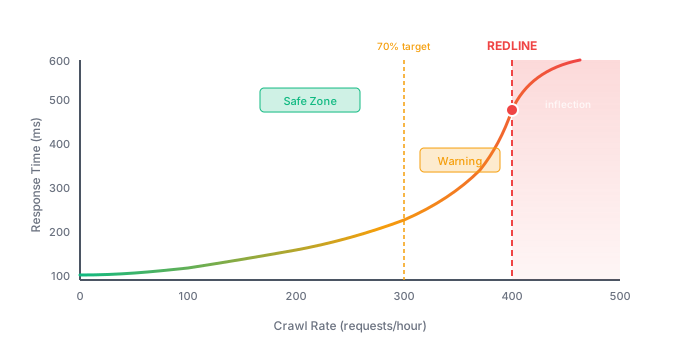
Target: Stay below 70% of redline. Leave yourself headroom. Because one day, and I promise you this day is coming, marketing is going to launch a campaign and it's going to go viral and suddenly you're going to have ten times the traffic and if you're already at redline that's when everything falls over and everyone looks at engineering like it's their fault.
Fix: Know your limit before you hit it. Monitor proximity. Upgrade capacity before reaching redline. Crawl-delay is emergency only.
8. Warm-Up Cycle
Engine: Cold engines run rough. Oil hasn't circulated. Metal hasn't expanded. Don't rev cold.
SEO: Cold caches serve slowly.
After deployment, caches are empty:
- CDN edge caches
- Server-side page caches
- Database query caches
- Application caches
First requests after deployment hit cold caches. Slow responses. And wouldn't you know it, by some cosmic law that governs the universe, Googlebot always seems to show up right after you deploy. Every time. It's like it knows. It can smell the cold cache.
Fix:
- Identify top 100-500 URLs by traffic
- After deployment, programmatically request each
- Hit from multiple geo locations if CDN is distributed
- Monitor until P95 response time stabilizes
- Don't take real load until warm
9. Idle Stability
Engine: Minimum RPM to avoid stalling.
SEO: Minimum crawl frequency to stay fresh in index.
| Site Type | Idle Requirement |
|---|---|
| News | Very high-hourly freshness |
| E-commerce | High-daily changes |
| B2B | Medium-weekly/monthly |
| Reference | Low-infrequent updates |
Crawl Freshness = Average days since last crawl, per section
Monitor: Search Console crawl stats. Log file analysis by section.
If idle drops: Resubmit your sitemap. Ping the stale URLs via Search Console. Link from your fresh pages to the stale sections. Or, and this is the one that actually works, publish new content in the stale section. Google has the memory of a goldfish with ADHD. You have to keep reminding it you exist.
10. Knock Detection
Engine: Abnormal combustion. Knock sensors detect it. Untreated, destroys pistons.
SEO: Abnormal error patterns signal brewing problems.
Knock signatures:
| Signal | Indicates |
|---|---|
| Spike in soft 404s | Template producing empty pages |
| Spike in 5xx | Server instability |
| Crawl rate sudden drop | Throttling or robots.txt issue |
| Index coverage drop (no changes) | Algorithmic or canonical problem |
| Crawl error rate >1% | Infrastructure problems |
Build knock sensors:
- Pull Search Console API daily
- Parse logs for Googlebot behavior
- Establish baselines
- Alert on deviations (>2 standard deviations)
Response: Diagnose immediately. Find the root cause. Fix the root cause, not the symptom. And I'm begging you, please, do not let anyone in the meeting say "we'll monitor it." Monitoring is not a fix. Monitoring is what you do while the problem gets worse. Monitoring is the SEO equivalent of thoughts and prayers.
11. Displacement
Engine: Total swept volume of cylinders. Bigger displacement needs bigger supporting systems.
SEO: Total crawl load you're asking Google to handle.
Displacement = (Total indexable URLs) × (Complexity factor)
Complexity factors:
- Simple HTML: 1.0
- Moderate JS: 1.2-1.5
- Client-side rendered: 2.0-3.0
- Heavy/slow: 3.0+
Compare to capacity:
- Crawl budget (from logs)
- Server capacity (tested redline)
Displacement >> capacity: Your site is too big for your engine. This is a common condition, especially among sites that spent five years adding content without ever asking whether they should. You have two options: prune the site down to what you can actually support, or upgrade your infrastructure until it can handle what you've built. There is no third option where you just hope it works out.
Displacement << capacity: Headroom exists. Can scale.
12. Stroke Optimization
Engine: Each phase of the stroke takes time. Optimize each phase.
SEO: Each phase of page load takes time.
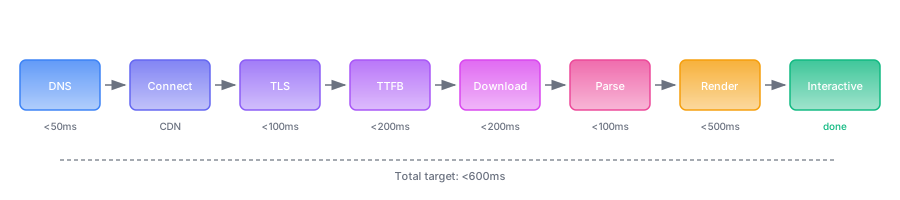
| Phase | Target | If Slow |
|---|---|---|
| DNS | <50ms | Faster provider, dns-prefetch |
| Connect | - | CDN (closer servers) |
| TLS | <100ms | TLS 1.3, session resumption, short cert chain |
| TTFB | <200ms | Server optimization, caching, edge compute |
| Download | <200ms | Compression, reduce size |
| Parse | <100ms | Reduce DOM size, flatten structure |
| Render | <500ms | Critical CSS, defer JS, preload LCP |
Diagnose: Run the waterfall. Find the slowest phase. Fix that phase. Run the waterfall again. Find the new slowest phase. Fix that one too. Keep going. There's always another bottleneck. The bottlenecks are like a hydra, except instead of growing two new heads when you cut one off, you just discover the head that was hiding behind the first head all along.
Dashboard
| Parameter | Metric | Target |
|---|---|---|
| Compression Ratio | Content / total bytes | >0.30 |
| Air-Fuel Ratio | Content / code bytes | By page type |
| Volumetric Efficiency | Valuable / total crawls | >60% |
| Turbo Lag | Publish → index time | <48 hours |
| Backpressure | Third-party blocking | <200ms |
| Stroke Time | Request → render | <600ms |
| Redline Headroom | Crawl rate / max | <70% |
| Idle Stability | Days since crawl | Per section |
| Knock Rate | Errors / attempts | <1% |
Diagnostic Reference
| Symptom | Check |
|---|---|
| Slow indexing | Server response, sitemap freshness |
| Erratic crawl rate | Error rates, server stability |
| Crawl errors under load | Server capacity, CDN |
| Poor CWV despite fast TTFB | Rendering path, blocking resources |
| Wasted crawl budget | URL parameters, thin pages |
| Slow render, fast server | Third-party scripts |
| Slow first visits | Cache warming |
| Index declining | Errors, canonicals, robots.txt |
Four strokes. Twelve concepts. Specific numbers.
The engine runs or it doesn't.