
There is a particular kind of hubris that afflicts web developers and SEO people alike, which is the belief that changing URLs is a technical problem with a technical solution, that you simply set up some redirects and everything will be fine, that Google will figure it out because Google is smart and you are smart and surely two smart parties can come to an understanding about where a page lives now versus where it lived before.
This is wrong, and the wrongness has a specific shape, which is the shape of your traffic graph three weeks after launch when someone finally notices that organic sessions have fallen off a cliff and everyone starts asking questions that should have been asked months ago.
Migration Timeline Diagram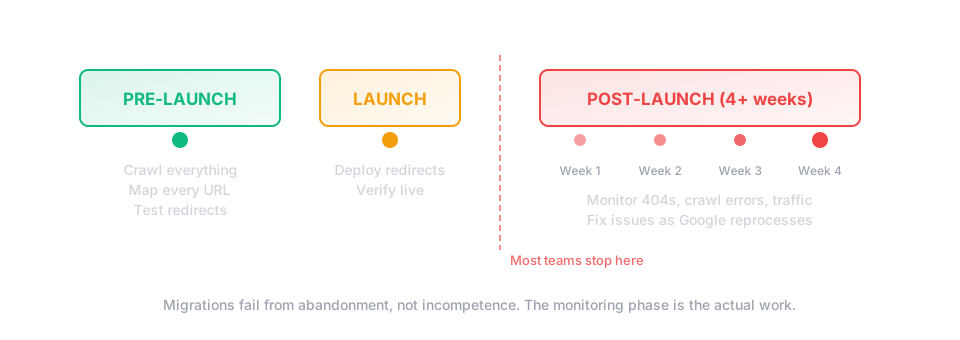
I have seen URL migrations go beautifully and I have seen them go catastrophically and the difference is almost never the complexity of the technical implementation, it is almost always whether someone sat down beforehand and did the deeply unsexy work of mapping every single old URL to its new destination, then checked that mapping, then checked it again, then had someone else check it who hadn't gone blind from staring at spreadsheets, and then monitored the aftermath like a doctor monitoring a patient who just came out of surgery rather than like a project manager who declared victory on launch day and moved on to the next sprint.
Why URL Migrations Fail (A Taxonomy of Disaster)
Failure Modes Diagram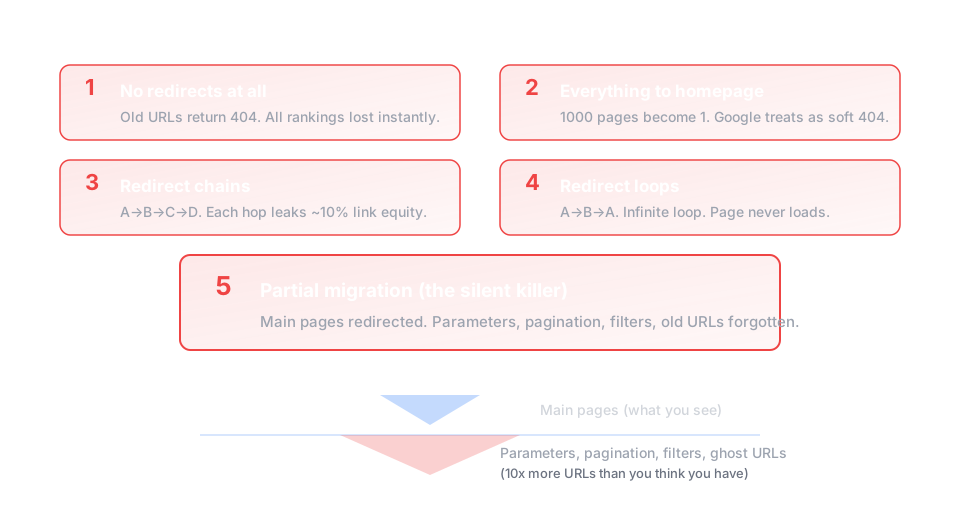
The first way a migration fails is the obvious way, which is that nobody sets up redirects at all, the old URLs simply return 404s, and Google, which had been sending you traffic to those URLs for years, now sends users into a void where they bounce immediately and Google takes note and thinks perhaps these people are not as trustworthy as we thought, perhaps we should send traffic elsewhere.
The homepage redirect trap
Redirecting everything to the homepage is the second most common migration disaster. You are telling Google that all of the specific content that used to live at those thousand URLs is now gone, replaced by a single page that cannot possibly satisfy the thousand different intents those pages used to serve.
The third way is the redirect chain, where old URL A redirects to old URL B which redirects to new URL C, except someone added another redirect so now it goes to URL D, and Google will follow these chains but only up to a point, maybe five hops, maybe ten, nobody knows exactly, and somewhere in that chain the link equity that was supposed to flow to your new page is leaking out like water through a cracked pipe.
The fourth way is the redirect loop, where URL A redirects to URL B which redirects to URL A, and this is both the easiest to create accidentally and the easiest to detect if you bother to check, which people often do not, because checking is boring and tedious and the human brain would rather move on to interesting problems than verify that boring things are actually working.
The fifth way, and this is the one that gets even experienced people, is the partial migration, where you redirect the main pages but forget about the URL parameters, the pagination, the filtered views, the print versions, the AMP pages if you still have those, the hreflang alternates if you have international sites, the whole long tail of URLs that you forgot existed because they do not appear in your main navigation but absolutely do appear in Google's index, thousands of them, quietly accumulating 404 errors while you celebrate your successful launch.
The Actual Process (What You Should Do)
URL Discovery Gap Diagram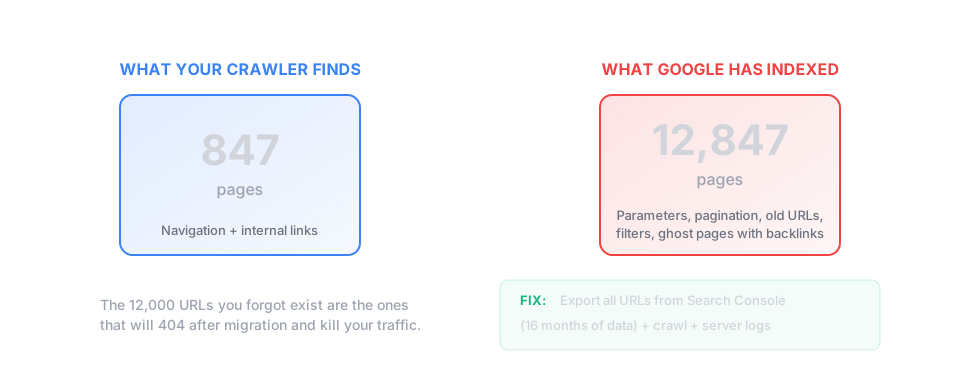
Step one is to crawl your existing site, the whole thing, every URL Google knows about, which means using your server logs or Google Search Console or a crawler like Screaming Frog set to a very high limit, because you need to find every URL that currently receives traffic or has backlinks or exists in Google's index, not just the URLs you think are important.
Export this list and then export another list from Google Search Console of every URL that has received at least one impression in the past sixteen months, because there will be URLs in that list that your crawler did not find, old URLs that still get traffic even though they are not linked from anywhere on your current site, ghost URLs that you forgot existed but Google remembers.
Now you have a list that is probably much longer than you expected, possibly tens of thousands of URLs for a site you thought had a few hundred pages, and this is the moment where people usually panic and start looking for shortcuts, and I am here to tell you that the shortcuts are traps.
Step two is to map every URL in that list to its new destination, and when I say every URL I mean every URL, not just the important ones, not just the ones with traffic, every single one, because the one you skip will be the one with backlinks from the New York Times or the one that ranks first for a query you forgot you ranked for.
This mapping is a spreadsheet with at minimum two columns: old URL, new URL, and ideally a third column for notes explaining why you mapped it that way, because you will forget and someone will ask and the answer should not be "I don't remember, it made sense at the time."
For URLs that have a direct equivalent in the new structure, the mapping is obvious: old blog post goes to new blog post at new URL, done, move on.
For URLs that have no direct equivalent, you have choices, none of them perfect: redirect to the closest relevant page, redirect to a category page, redirect to a search results page, or return a 410 Gone, which tells Google that this content is deliberately removed rather than accidentally missing, and sometimes that is the honest answer.
Do not redirect to the homepage unless the old URL was itself the homepage or a functional equivalent.
Step three is to implement the redirects, which is the part that feels like the actual work but is really just transcription if you did steps one and two correctly, and the implementation method depends on your server and your platform but the principle is the same: every old URL should return a 301 redirect to its mapped new URL, not a 302 temporary redirect, a 301 permanent redirect, because you are telling Google this change is forever.
Test the redirects before launch by picking a random sample of maybe fifty URLs from your mapping spreadsheet and checking each one manually, actually typing the old URL into a browser and confirming it ends up at the right new URL with no chains or loops or errors.
Then test them automatically by running your entire list through a redirect checker or writing a script that hits every old URL and logs the response code and final destination, because manual testing catches obvious errors but automated testing catches the edge cases that will ruin your traffic.
Step four, and this is where most people stop and most migrations fail, is to monitor obsessively for at least four weeks after launch.
The Monitoring Checklist (What to Watch)
In Google Search Console, watch for crawl errors, specifically 404s, which will spike after any migration as Google discovers URLs that were not properly redirected, and some spike is normal but a massive spike or a spike that does not decrease over time means something is wrong with your mapping.
Watch for the "Not Found (404)" page in the Coverage report, export that list regularly, compare it to your redirect mapping, and for any URL that shows up as a 404 that should have been redirected, figure out why and fix it.
Watch your impressions and clicks in Search Console, knowing they will probably drop initially as Google reprocesses your site, but they should recover within two to four weeks, and if they do not recover, if they keep dropping or plateau at a much lower level, something went wrong and you need to investigate.
In your analytics, watch for landing pages that suddenly have no traffic, which suggests those pages were not properly redirected, and watch for the homepage having a sudden spike in traffic, which suggests you accidentally redirected a bunch of pages to the homepage and are now getting traffic that has nowhere useful to go.
Watch your server logs for 404s and redirect chains, because Google Search Console data is delayed by days and your server logs are immediate, and if something is broken you want to know now, not next week.
Watch for your old URLs in Google search results, which should gradually be replaced by your new URLs over a period of weeks, and if after a month you are still seeing old URLs in search results, Google has not processed your redirects correctly and you should request indexing of the new URLs through Search Console.
The Spreadsheet You Need
Minimum viable redirect mapping spreadsheet:
Post-launch monitoring checklist (daily for first week, weekly for next month):
The Thing Nobody Tells You
URL migrations are not a project with a completion date, they are a process with a monitoring phase that lasts months, and the reason most migrations fail is not technical incompetence but organizational impatience, the belief that once the redirects are live the work is done, when actually the work has just entered its most critical phase.
Google does not update its index instantaneously, it takes weeks to months to reprocess a site after a major URL change, and during that time you need someone watching, someone who knows what normal looks like and can recognize abnormal, someone empowered to escalate when things go wrong.
The companies that execute URL migrations successfully are not the ones with the best developers, they are the ones that assign an owner to the migration who is responsible for monitoring it for ninety days after launch, who has the authority to halt other projects if the migration is failing, who treats the post-launch period with the same seriousness as the pre-launch planning.
The companies that execute URL migrations catastrophically are the ones that treat launch day as the finish line, that reassign the team immediately afterward, that notice the traffic drop six weeks later and have no one left who remembers what was supposed to happen.
You can do everything right technically and still fail organizationally, which is the most frustrating kind of failure because it was entirely preventable, someone just needed to keep watching.
So: crawl everything, map everything, implement carefully, test thoroughly, then watch like your traffic depends on it, because it does.